
How to Clear a Panel Tamper Alert on a Qolsys IQ Panel 4 or IQ Panel 5

“Panel Tamper” sounds like someone pried your alarm off the wall. On a Qolsys IQ Panel 4 or IQ Panel 5 it almost never means that. It means the spring-loaded tamper switch on the back of the panel is not pressed against the backplate, and something as small as a loose locking screw is enough. Most of the tamper calls we take across Utah County and the Salt Lake Valley come the week after a battery swap or a move. Here is what sets it off, how to clear it in five minutes without tools, how a sensor tamper differs, and when a tamper that keeps coming back needs a visit.
- It is a seating problem. The panel is not fully latched to its backplate, the locking screw is loose or missing, or something inside is holding the case open a hair.
- Fix the cause, then acknowledge. Press the panel home, snug the screw, then clear the alert from the status bar at the top of the screen. Acknowledging first just brings it back.
- Do it disarmed. A panel tamper while armed can be treated as an alarm. Disarm before you reseat anything.
- Sensor tampers are the same idea. A door contact or motion with its cover not snapped shut after a battery change.
- If it returns after a clean reseat, the spring, the backplate or the mounting is the problem. That is a short service visit, not a new panel.
What actually causes a panel tamper
Both panels have what Qolsys calls a dual panel and wall tamper switch with spring release: a small plunger on the back of the panel that must stay compressed against the backplate. The locking screw on the bottom edge, with its retention spring, is what holds the panel down on that plunger. So the alert appears when:
- The panel is not fully hooked and latched onto its wall backplate or table stand. This is the most common cause by far.
- The locking screw is loose, cross-threaded or missing.
- Something inside, usually the backup battery or its cable, is slightly out of place and holding the case off the plate.
- The panel was recently opened for a battery replacement or a daughter card and not quite reseated.
- The panel was pulled off the wall on purpose. The IQ Panel 5 also has a break-away wall tamper for commercial-grade installs, which trips if the backplate itself leaves the wall.
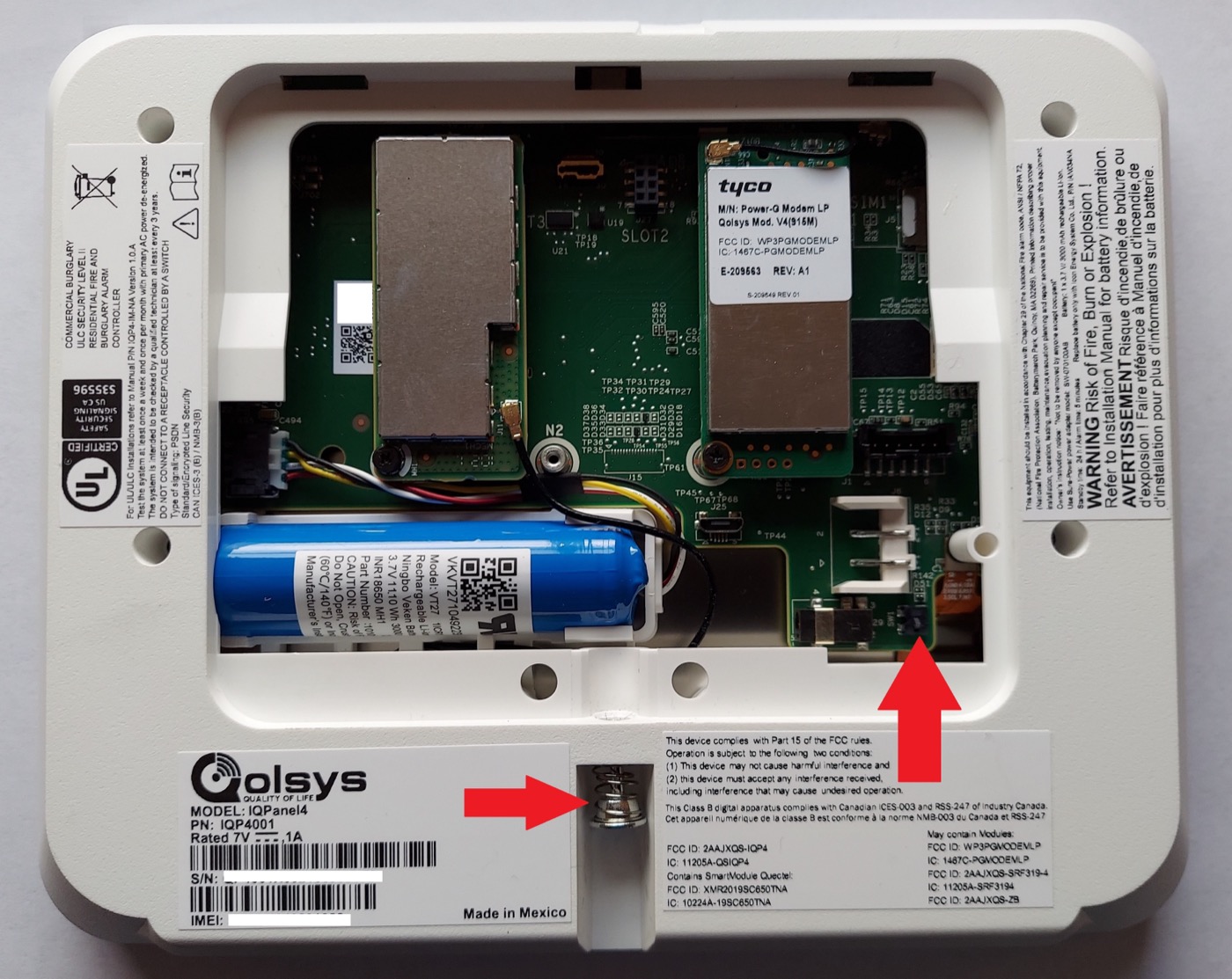
How to clear it
- Disarm the system if it is not already.
- Press the panel gently against the wall. Check all four edges for a gap between the panel and the backplate. You are listening for the faint click of the tamper spring compressing. On a table stand, press the panel down into the stand the same way.
- Check the locking screw on the bottom edge. Tighten it snug with a small Phillips, not cranked; overtightening flexes the case and can hold the switch open. If it is missing, we carry the correct one.
- If the panel was recently opened, loosen the screw, lift the panel off, and look inside before you put it back. The battery should sit flat in its hold-down with the cable routed between the battery and the daughter cards, not pinched under the case edge. Hook the panel at the top, swing it down flat, and retighten. The tamper switch sits near the bottom right on an IQ Panel 4 (bottom left on the older IQ Panel 2), and on the back of the IQ Panel 5 against the SmartMount plate.
- Acknowledge the alert. Tap the message or status area at the top of the screen, open Alerts, find the Panel Tamper entry and acknowledge it. Once the switch is seated the alert clears and stays cleared. If it reappears within a minute, the switch is still open; go back to step 2.
Sensor tampers are the same idea, smaller
A tamper on a door contact, motion detector or glass-break means that device’s cover is open, usually because someone changed its battery and did not snap the cover fully home, or a contact got knocked off its mounting plate. Press the cover until it clicks all the way around, give the panel a few seconds, then acknowledge the alert the same way. If a sensor tampers with its cover visibly closed, its tamper spring is bent and the sensor is a cheap replacement.
Gotchas we see on Utah service calls
The post-battery tamper. The single most common one. A homeowner does a perfect battery swap, then the panel tampers an hour later because the locking screw went in finger-tight. Snug it.
Tamper while armed. If the panel tampers while the system is armed, expect the siren and expect the monitoring center to call. Give your passcode and tell them it was the panel. Then fix the seat with the system disarmed.
The installer who disabled it. The panel tamper switch can be turned off in the installer settings. We have found takeover panels where a previous company did exactly that rather than fix a bad mount. We turn it back on and fix the mount; the switch is part of what makes a monitored alarm monitored.
Frequently asked
Will a tamper alert send the police? Not on its own. While disarmed, a panel tamper is a trouble condition that the monitoring center logs and may call you about. While armed, it can be handled as an alarm, which is why you disarm first.
Is the IQ Panel 5 any different? Same switch, same locking screw, same alert, same fix. The IQ Panel 5 adds a break-away wall tamper for UL commercial installs, which only matters if the backplate comes off the wall.
I acknowledged it and it came right back. The switch is still open. Reseat the panel and check the screw before acknowledging again. If it returns after a careful reseat, the spring or the plate is the problem.
Can I clear it from the Alarm.com app? The app shows the trouble and notifies you, but the physical fix and the acknowledgment happen at the panel.
Does a reboot clear a tamper? No. A reboot clears software hiccups; a tamper is a mechanical switch, and it reports again as soon as the panel is back up.
Keeps coming back? A tamper that returns after you have seated everything usually means a bent tamper spring, a warped backplate, or a panel mounted slightly off. That is a quick fix on a service visit. Call (928) THE-PROS, or if your alarm company left you googling this instead of answering, we take over Qolsys and Alarm.com systems across Utah with month-to-month monitoring and real support.
Shield Low Voltage is a DOPL-licensed Utah alarm company in Lehi. More walkthroughs in our tutorial library, including how to stop a beeping panel. Product details are from Qolsys’s documentation as of October 2026: IQ Panel 5 Installation Manual (rev. 2509) and IQ Panel 4 Installation Manual (firmware 4.5.0).


